> ## Documentation Index
> Fetch the complete documentation index at: https://sequence-0fb8d9e6-codex-update-discord-invite.mintlify.site/llms.txt
> Use this file to discover all available pages before exploring further.
# Sequence BuilderのWebhooks
> このセクションでは、ゲーム開発者がSequence BuilderでWebhooksを使い、複数のブロックチェーン上のイベントを監視する方法を説明します。
Sequence Builderは、ゲーム開発者向けに、当社が提供する複数のブロックチェーン上のイベントを監視するインデクサーを提供し、httpsコールバックで通知します。
cURL、TypeScript、Goを使ったプログラム的なWebhooks追加方法をご希望の場合は、[こちらのウォークスルー](/api-references/indexer/examples/webhook-listener)をご覧ください。
#### ゲームでどのようなデータを監視できますか?
* コントラクトからのミント
* TokenIDの移転
* アカウントアドレスによるトランザクション
* コントラクトから発行されたイベントトピック
* コントラクトから発行されたイベントトピックハッシュ
## Webhooksの作成方法
以下の手順でWebhooksを作成できます
1. プロジェクトを選択し、Webhooksセクションへ移動
2. ネットワークを選択し、新しいWebhookを追加
3. Webhookの詳細を入力
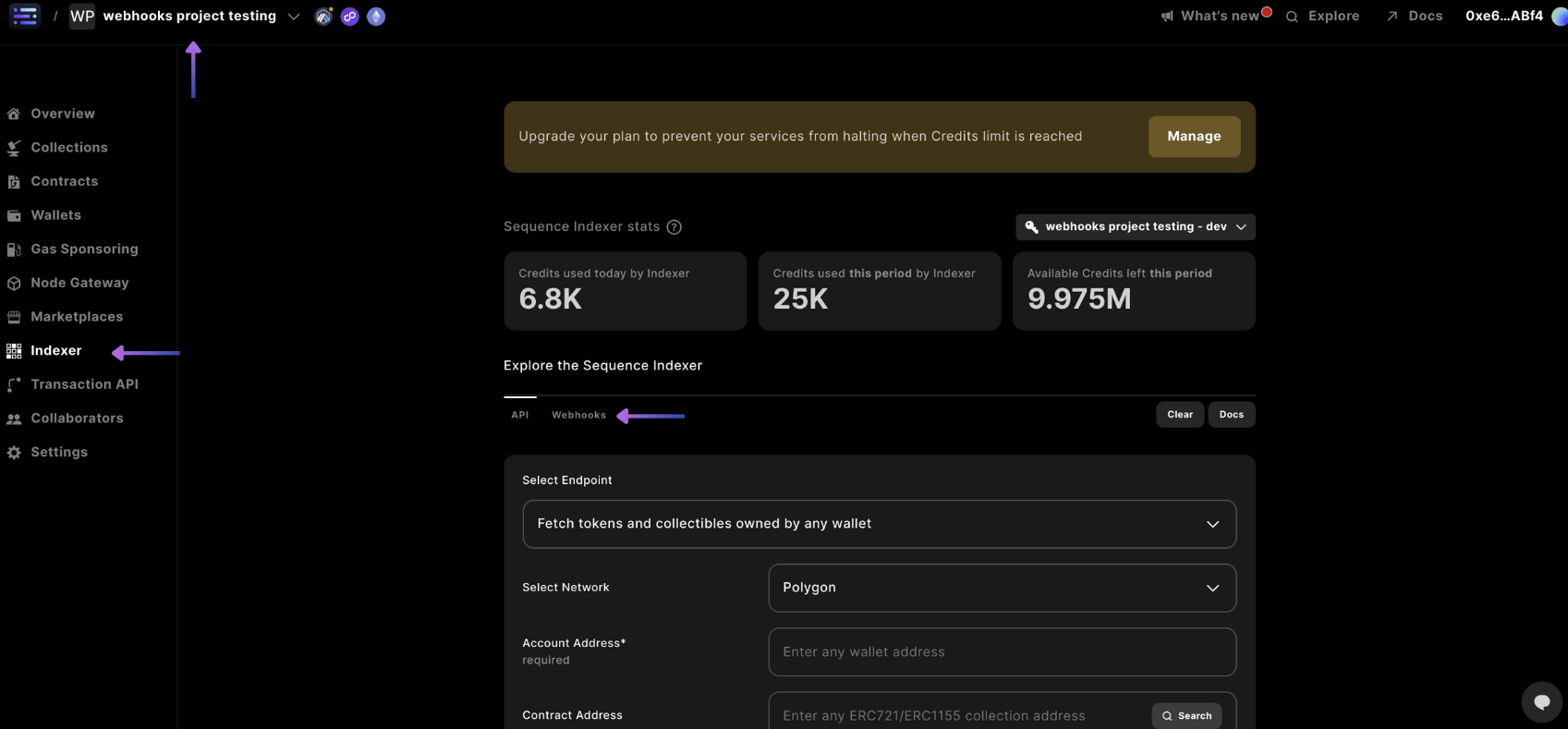
画面左上でプロジェクトを選択し、サイドバーの`Indexer`セクションから`Webhooks`タブを選択します。
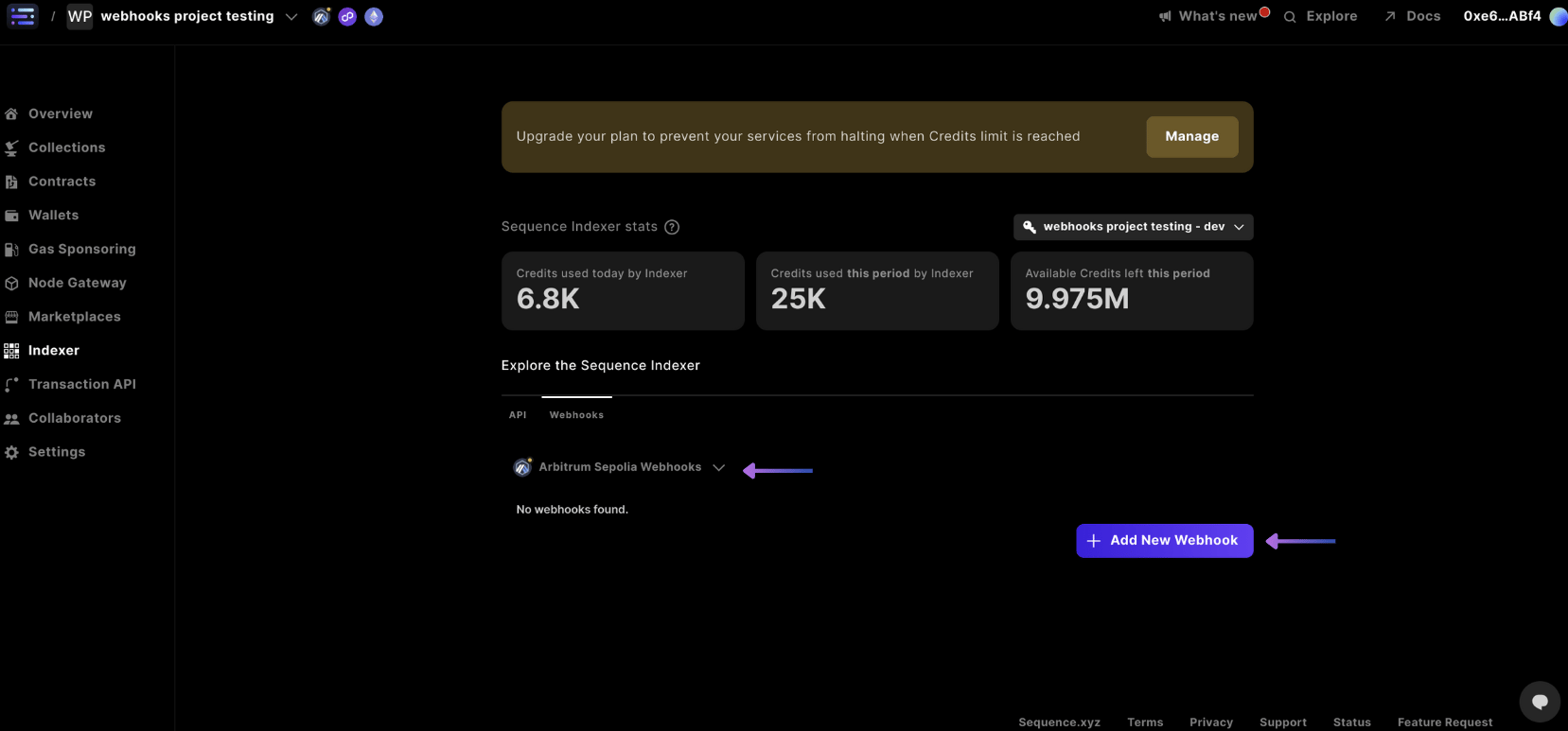
 Webhooksタブ下のドロップダウンから、プロジェクト内でWebhookを作成したいネットワークを選択します。目的のネットワークが表示されていない場合は、[ネットワークを追加](/solutions/builder/project-settings#3-network-settings)してから、その後、`+ Add New Webhook` を選択してください。
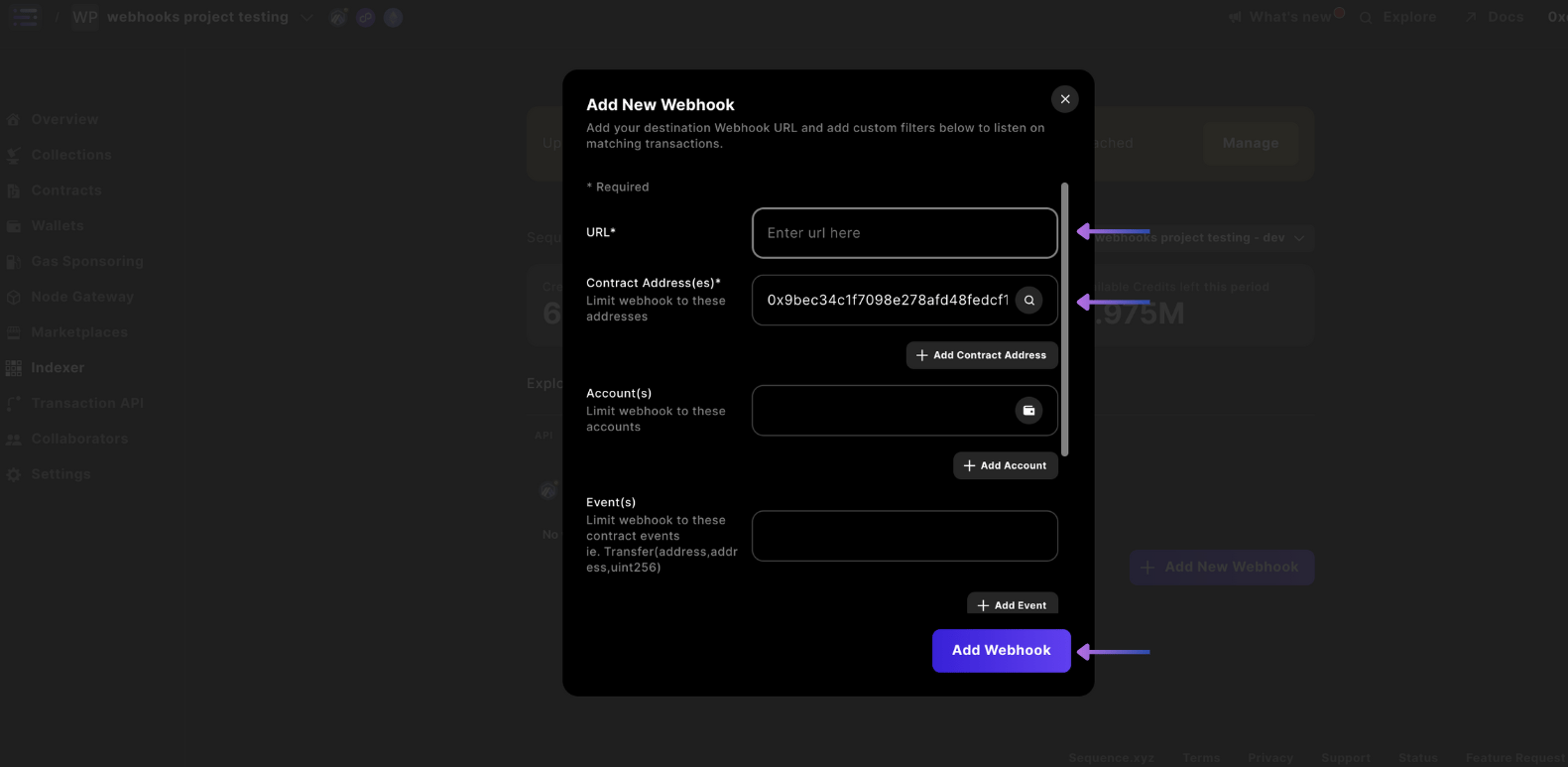
 Webhookの`URL`、`Contract Address(es)`、'Events'など、必要な詳細を入力します。
Eventsフィールドでは、任意のコントラクトイベントを解析できますが、スマートコントラクトに記載されている通り、正確にイベントを入力する必要があります。たとえば、トランスファーイベントを検出する場合は、`indexed`キーワードを含めて `Transfer(address indexed from, address indexed to, uint256 amount)` と入力します。一般的なイベントタイプの例は[こちら](/api-references/indexer/examples/webhook-listener#on-chain-token-event-types)で、よく使われるケースやSequence特有のものも確認できます。
希望するフィールドを入力したら、`Add Webhook` を選択してください。
Webhookエンドポイントが必要な場合は、[webhook.site](https://webhook.site/) をご利用いただけます。
または、以下のいずれかのテンプレートコードを利用することもできます。
[Nodejs TypeScript Webhook](https://github.com/0xsequence-demos/template-nodejs-webhook-server)([ngrok](https://ngrok.com/)と組み合わせて利用)
Webhookの`URL`、`Contract Address(es)`、'Events'など、必要な詳細を入力します。
Eventsフィールドでは、任意のコントラクトイベントを解析できますが、スマートコントラクトに記載されている通り、正確にイベントを入力する必要があります。たとえば、トランスファーイベントを検出する場合は、`indexed`キーワードを含めて `Transfer(address indexed from, address indexed to, uint256 amount)` と入力します。一般的なイベントタイプの例は[こちら](/api-references/indexer/examples/webhook-listener#on-chain-token-event-types)で、よく使われるケースやSequence特有のものも確認できます。
希望するフィールドを入力したら、`Add Webhook` を選択してください。
Webhookエンドポイントが必要な場合は、[webhook.site](https://webhook.site/) をご利用いただけます。
または、以下のいずれかのテンプレートコードを利用することもできます。
[Nodejs TypeScript Webhook](https://github.com/0xsequence-demos/template-nodejs-webhook-server)([ngrok](https://ngrok.com/)と組み合わせて利用)
 これで完了です!
## Webhookの削除または更新
以下の手順でWebhookの更新や削除を行う方法をご案内します。
1. プロジェクトを選択し、Webhooksセクションへ移動
2. Webhookを更新または削除するには、ギアアイコンを選択してください。
3. Webhookの更新または削除
画面左上でプロジェクトを選択し、サイドバーの`Indexer`セクションから`Webhooks`タブを選択します。
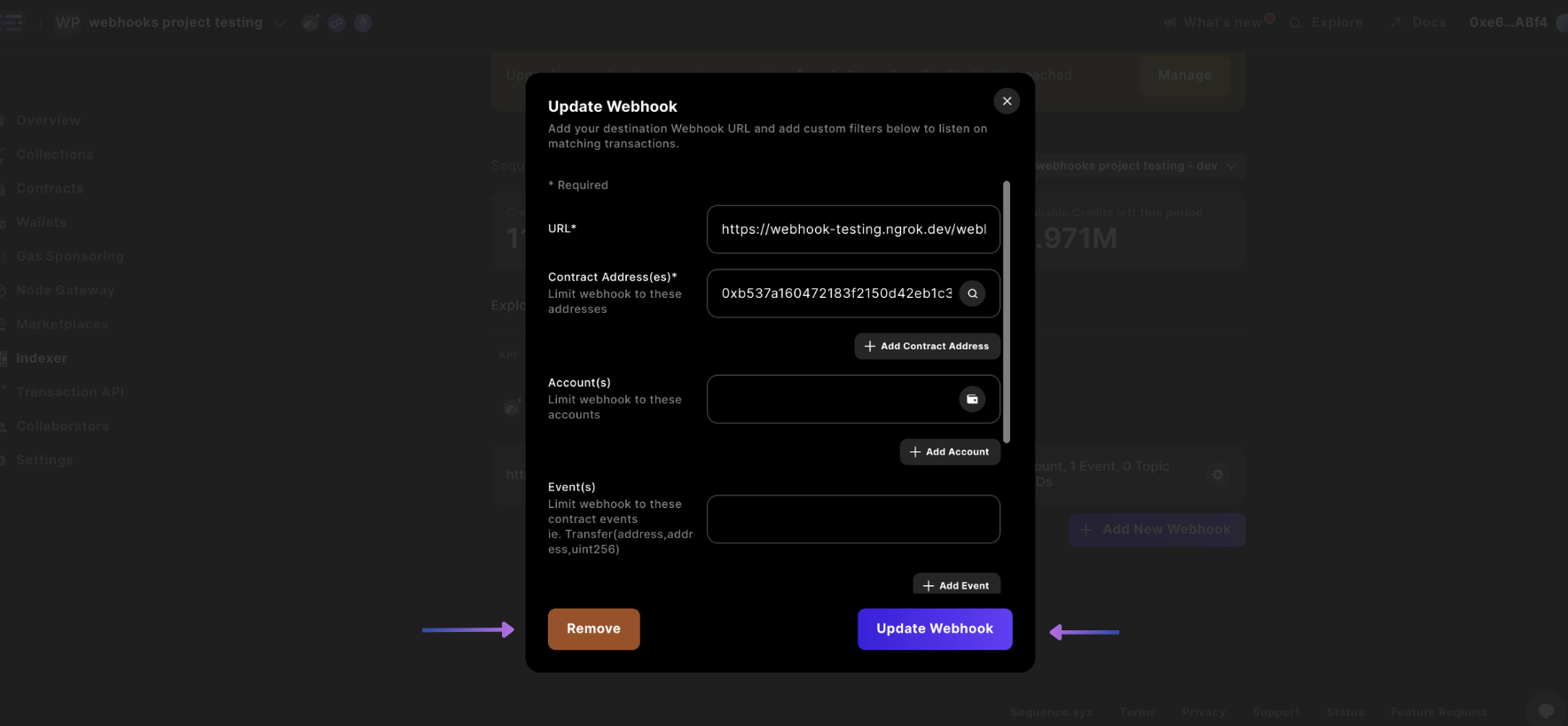
Webhook画面で、削除または更新したいWebhookのギア `⚙` を選択します。
これで完了です!
## Webhookの削除または更新
以下の手順でWebhookの更新や削除を行う方法をご案内します。
1. プロジェクトを選択し、Webhooksセクションへ移動
2. Webhookを更新または削除するには、ギアアイコンを選択してください。
3. Webhookの更新または削除
画面左上でプロジェクトを選択し、サイドバーの`Indexer`セクションから`Webhooks`タブを選択します。
Webhook画面で、削除または更新したいWebhookのギア `⚙` を選択します。
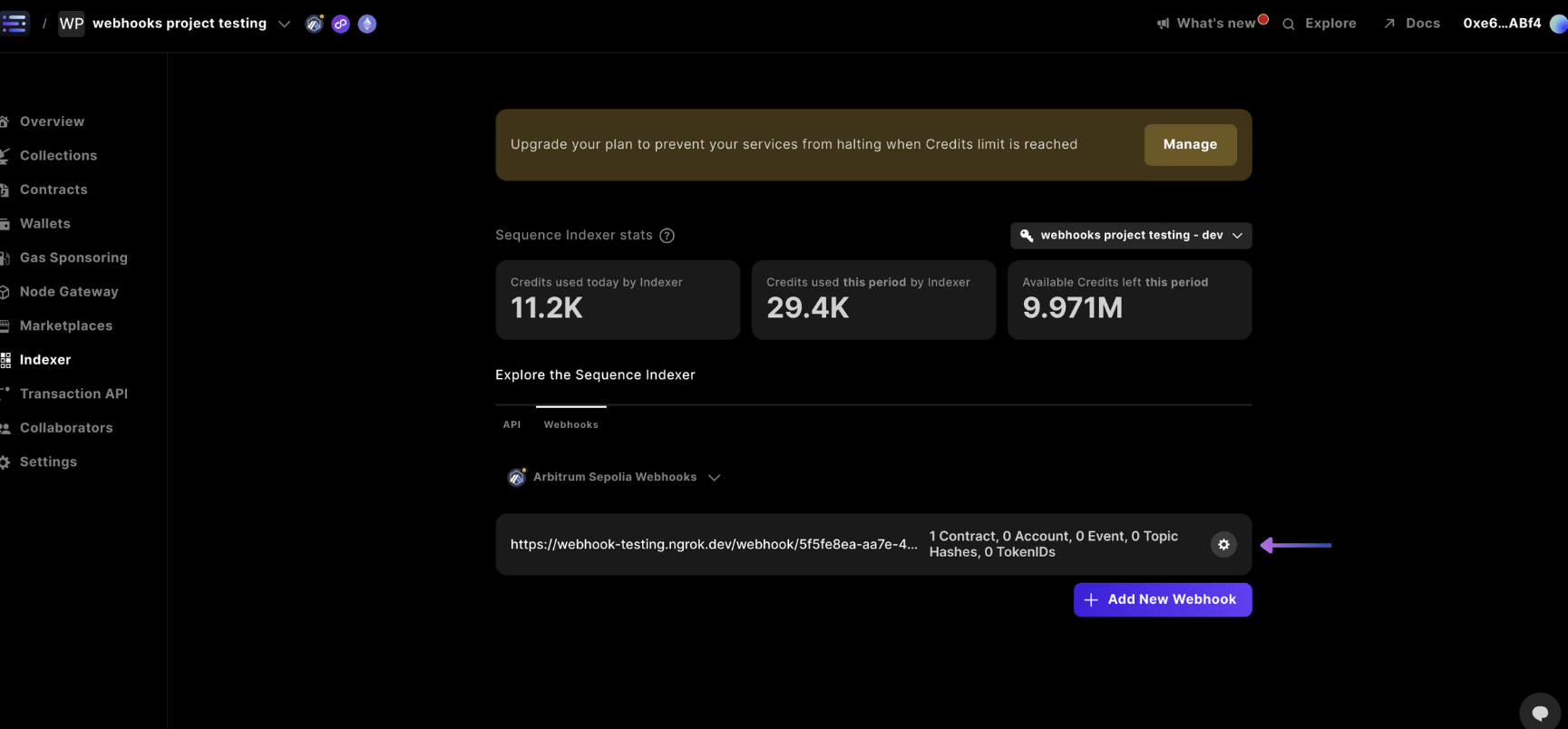 その後、`Update Webhook` または `Remove` を選択してWebhookを更新または削除できます。